EQ's configuration defaults to using margin (not markup) but some settings can be customised to markup if required.
Markup = the amount by which the cost of a product is increased in order to determine the selling price.
Margin = sales minus the cost of goods sold.
Example:
A product costs £100
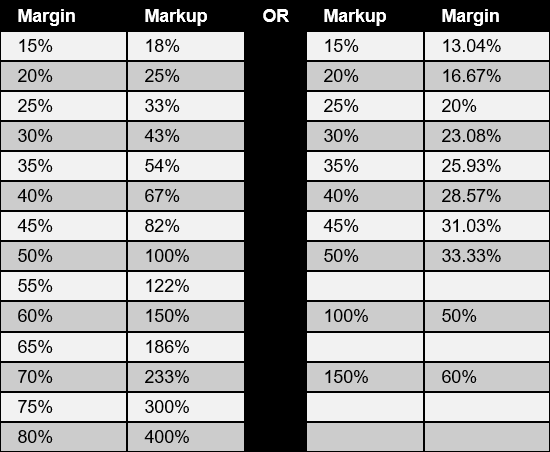
With a 40% margin.... it is sold for £166.67 (that's a markup of 66.67%)
With a 40% markup.... it is sold for £140.00 (that's a margin of 28.57%)
This article covers:
Margin and markup comparison table
System setting for pricing
See the setting in System Config > Quotations & Pricing > Selling Price Calculation.

Margin/markup calculator
EQ includes a small margin/markup calculator to help determine the selling price you want.
- Open the Supplier List icon
- Click any supplier's name for which you have catalogues loaded
- Click the Catalogues button on the left.
- Click the Margin button
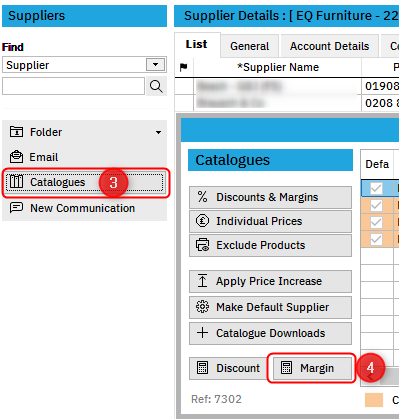
The calculator will open:

Enter any 2 values to return the others. The other boxes will refresh immediately.
You can click the Copy icon to conveniently copy the margin or markup figure into the appropriate settings boxes.
Margin and markup comparison table