
The projects screens provides individual views of quotes, orders, invoices etc. It contains links to all the paperwork that has been raised. The advantage of the projects screen is that you can filter the lists, e.g. see data between particular dates. (The projects screen is not available in EQ Sales Manager).
Click Project Lists on the top toolbar:
Any columns displaying a * in the column heading have right-click options.
You can right-click on the Order Ref in all of the tabs to access one common right-click menu.
Searching and Filtering
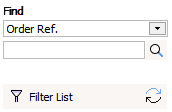 Find
Find
Select the criteria you want to search against, from the drop down box.
Enter the characters in the box and click the magnifying glass icon to jump straight to the relevant record.
Filter List
In addition to searching for 1 customer you can filter the list to show all matching records.
You can save filters quick access and you can work with bulk commands. See Saved Filters.
The projects screen is split into a series of windows for each of these: